🗂️ How to Conduct a Weekly Planning Session
Learn how to run your Weekly Planning Session in Qeap. Review your goals, check your Action Score, reflect on what worked, and plan focused actions for the week ahead. You can even set a reminder inside the app to never miss your session.

Weekly planning is the backbone of Qeap success. Every week, take 20–30 minutes to reset, reflect, and prepare for the next 7 days.
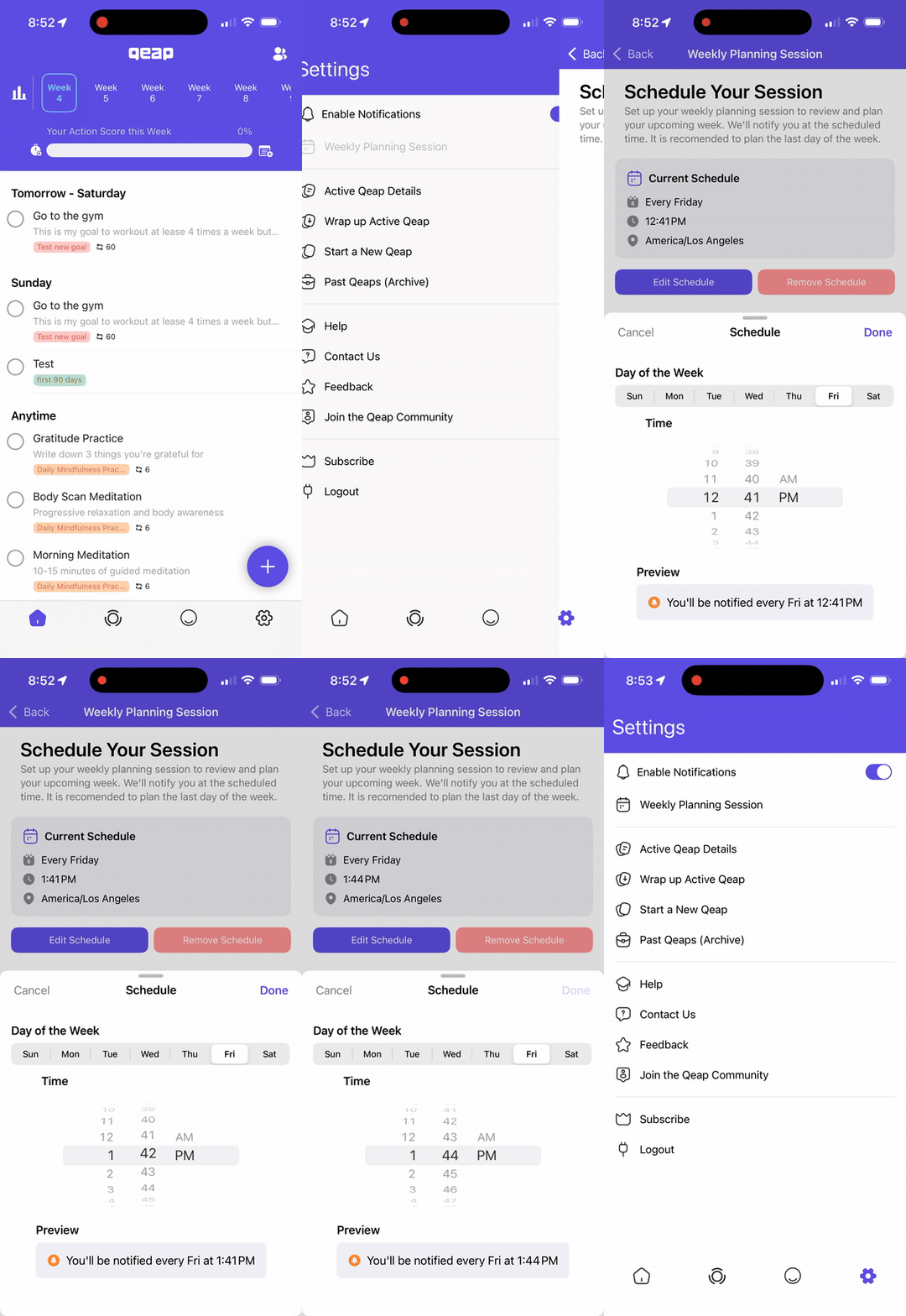
You can also set up a reminder in the Qeap app so you never miss your session:
- Go to Settings.
- Tap on Weekly Planning Session.
- Pick the time that works best for you. (We recommend the last day of your week, just before the new week begins.)
1. Review Your Goals
- Revisit each goal statement and remind yourself why it matters.
- Look at tasks completed last week that supported the goal.
- Ask: Am I still on track? If not, why?
2. Review Your Action Score
Your Action Score tells you how well you executed last week.
- 80%+ = Great progress. Keep momentum.
- 60–79% = Some progress, but tighten focus or reduce distractions.
- Below 60% = Step back: Are you overcommitted, unclear, or working on the wrong things?
👉 Ask yourself:
- Why?
- Was it time?
- Was it distraction?
- Was it too much on your plate?
- Or… were you simply working on the wrong tasks?
- Read more about 📉 What to Do if Your Action Score Falls Below 80%
Write down 1–2 insights about why your score landed where it did. These answers will help you adjust your focus for the week ahead.
3. Reflect on Last Week’s Execution
- ✅ What got done? Celebrate all wins, even small ones.
- ❌ What didn’t get done? Note the blockers.
- 💡 Why not? Time, energy, clarity, or distraction?
Turn misses into lessons for the week ahead.
4. Set Priorities for the Week Ahead
Choose 1–2 must-win outcomes per goal.
- Which tasks will have the biggest impact?
- Which can be postponed, delegated, or dropped?
Keep it lean. Qeap works best when you focus on what matters most.
5. Plan Your Actions
- Assign tasks to specific days.
- Spread workload realistically across the week.
- Use the Bias for Action Timer or focus blocks to protect deep work.
Pro tip: Start your week with high-impact tasks to build momentum.
6. Confirm and Commit
- Re-read your commitment statement for motivation.
- Check that your plan is realistic.
- Write down one change you’ll make to avoid last week’s pitfalls.
✨ Remember: Weekly planning isn’t about cramming in more tasks. It’s about aligning your actions with your goals so each week moves you closer to realizing your potential.
How did we do?
🌟 How to Use Goal Templates in Qeap
💬 How to Complete Your Weekly Review